How to change Blender 2.76 fbx-export addon to libgdx g3dj, g3db export addon.
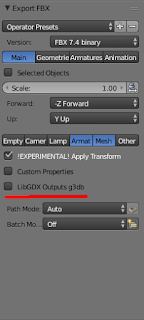
2,3日前にリリースされた最新版 Blender 3D 2.76 のfbx-exporterを libgdx-g3d のコンバーターへ変更する方法をpatch.txtで記述した。この バージョン2.76からOption指定Windowが大きく変わった ので注意してほしい。 改造はAddonの中で fbx-conv をシンプルに実行しているだけなので、当たり前だが非常にstableでメンテナンスも簡単である。 注意点はfbxファイルはコンバート成功後、自動に消されるので、消したくない場合はos.remove(keywords["filepath"])を削除する。 詳細: 以下のpatch.txtをblender-2.76-linux-glibc211-x86_64/2.76/scripts/addons/io_scene_fbx/の__init__.pyに当てるとlibgdxのg3dファイルのコンバートをしてくれるようになる。BinaryかJsonかのオプションも追加される。 https://github.com/libgdx/fbx-conv からfbx-convをDownload & installする。ソースだけではなくBinaryのダウンロードも可能だ。 Linux(Ubuntu15.04でテスト)ではfbx-conv-lin64を実行できるようにPATH環境変数に設定しなければならない。 BlenderでFbx-exportを実行すればよい。メニュー名などは自分の作業効率アップのため変えてみるのもよいだろう。 尚、fbx-conv-lin64をWindows用、MacOS用のコマンド名に変更し、PATHを設定すれば各OSで動作するハズ(未確認)。 Tips:さらに自作のaddonを自動に呼びたければos.remove(keywords["filepath"])の下に他のフォルダーのaddonの関数を書けばよい(importを忘れずに)。私はそうしている。 下図ではlibgdxのoutput optionが追加になっている。defaultでg3djを出力 P.S.1 I'm sorry for English guys! May be, English vers...
