投稿

ラベル(libgdx)が付いた投稿を表示しています

Unreal engine/DirectXとBlender/OpenGLの座標系

イメージ
 Unreal Engine/Direct X/Unity 左手座標系, left-handed coordinate system Blender/Open GL/Godot/LibGdx 右手座標系,right-handed coordinate system

MTX FrameworkのForkを最新のlibgdxとAndroid Studio2用に修正

イメージ
https://github.com/nakasya/MTX MTX Framework のForkを最新のlibgdxとAndroid Studio2用に修正してcommitしておきました。 私が作ったわけではないのですが、分かりやすく、ゲームで実用的なフレームワーク&ライブラリです。多少、不必要なclassやtypoがありますが、Libgdx上でシンプルに設計されています。  このForkでBuildはGradleに対応され, Mavenのinstallは不要です。 android/desktopのプラットフォーム対応です。iOSやGWTもちょと知識があれば作成出来ると思います。 MTXのチュートリアル http://moribitotechx.blogspot.jp/p/tutorial-series-libgdx-mtx.html 2014年以降、最新libgdxにメンテナンスされていなかったのは勿体無いと考え修正しました;-) Ubuntu15.10/16.04LTS, Libgdx 1.9.2, Android Studio 2でビルドし、 Nexus7(android5.x)とPCで実行テストしました。 PS. 話はかわるけどRoboVMがMSに潰されたのはショックです。 このようは動きは歴史上何度も繰り返されていますがプログラマの自由を制限するもで気持ちが良いものではありません。

Blender 2.77 Add-ons fbx-exporter with libgdx

イメージ
I tested fbx-export addon of blender 2.77. I think It was fixed animation different length in NLA-Editor. The 2.76 exported fbx data has weird animation for libgdx.

How to change Blender 2.76 fbx-export addon to libgdx g3dj, g3db export addon.

イメージ
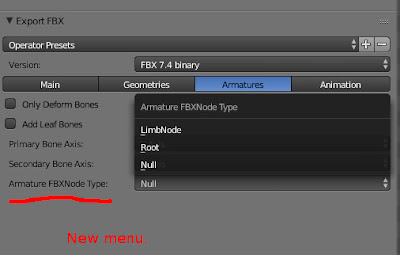
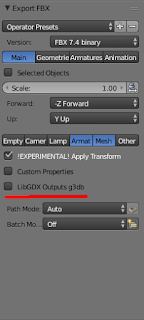
2,3日前にリリースされた最新版 Blender 3D 2.76 のfbx-exporterを libgdx-g3d のコンバーターへ変更する方法をpatch.txtで記述した。この バージョン2.76からOption指定Windowが大きく変わった ので注意してほしい。 改造はAddonの中で fbx-conv をシンプルに実行しているだけなので、当たり前だが非常にstableでメンテナンスも簡単である。 注意点はfbxファイルはコンバート成功後、自動に消されるので、消したくない場合はos.remove(keywords["filepath"])を削除する。 詳細: 以下のpatch.txtをblender-2.76-linux-glibc211-x86_64/2.76/scripts/addons/io_scene_fbx/の__init__.pyに当てるとlibgdxのg3dファイルのコンバートをしてくれるようになる。BinaryかJsonかのオプションも追加される。 https://github.com/libgdx/fbx-conv からfbx-convをDownload & installする。ソースだけではなくBinaryのダウンロードも可能だ。 Linux(Ubuntu15.04でテスト)ではfbx-conv-lin64を実行できるようにPATH環境変数に設定しなければならない。 BlenderでFbx-exportを実行すればよい。メニュー名などは自分の作業効率アップのため変えてみるのもよいだろう。 尚、fbx-conv-lin64をWindows用、MacOS用のコマンド名に変更し、PATHを設定すれば各OSで動作するハズ(未確認)。 Tips:さらに自作のaddonを自動に呼びたければos.remove(keywords["filepath"])の下に他のフォルダーのaddonの関数を書けばよい(importを忘れずに)。私はそうしている。 下図ではlibgdxのoutput optionが追加になっている。defaultでg3djを出力 P.S.1 I'm sorry for English guys! May be, English vers...

Blender 2.74 FBX-exporter of coordinate system was fixed.

イメージ
The Blender2.74 is coming soon. Its Fbx-exporter was fixed which outputs wrong coordinate system. It is great news for game developer;-) e.g. -Z Forward and Y Up setting outputs wrong rotation value which is around Y axis. It was fixed.

JUnitをLibgdx/Gradleで使うための設定方法

イメージ
Libgdx がGradleを使うようになりJUnitの設定もGradleで行わなければならない。 ここではシンプルで実用的な設定を紹介している。 core/testの下にJUnitを作成する場合はルートの build.gradleに以下のBold文字の箇所を追加する。 project(":core") {    apply plugin: "java"        dependencies {        compile "com.badlogicgames.gdx:gdx:$gdxVersion"        compile "com.badlogicgames.gdx:gdx-box2d:$gdxVersion"          testCompile "junit:junit:+"    }     sourceSets.test.java.srcDirs = ["test/"] } coreの下にtestフォルダを作る。(フォルダを変更したいときは上のsourceSets.test.java.srcDirsのフォルダを変更すれば良い) Eclipseを再起動(この後、自動にJunitのパッケージをmavenのreposからDownloadしてくれる) EclipseのNewを使って、JUnit Test caseを実行するとJUnit作成用ウィザードが現れる。あとはEclipseでおなじみの操作である。 Gradle Refresh Allを行う。 確認はEclipse LUNA(4.4.1),LibGdx Ver 1.5.3,Ubuntu14.10で行った。 余談だが、ボクの好みでIDEは Intellij IDEAを使いたい。しかし、 PyDev でBlenderのplugin開発も並行しておこなっているので...

libGDX 1.2.0

イメージ
libGDX 1.2.0がリリースされた。 http://www.badlogicgames.com/wordpress/?p=3461#disqus_thread ボクが注目したのはgdx-aiがextentionとして追加されたこと。ただし、いまのところはState Machineだけのようだ。 次は自律キャラクタではないか? また、最終的にはPath Finderまで組み込まれるのではないか? 尚、自律キャラのAIはボクがBlender Game Engine/Python 3へ移植して、Open Sourceにしているのでそちらも、参考にして欲しい。 本当はgithubで公開したいのだが、blenderファイルに入っているので、バイナリのためスムーズにできていないのが残念である。 何か方法があると思うが、調べる時間がいまないので、方法を知っていれば教えて欲しい。 http://nowcodingtime.blogspot.jp/2014/05/blender-3d-game-engine-ai-python-from.html

Blender 3Dとcom.badlogic.gdx.utils.GdxRuntimeException: Mesh must be indexed and triangulated

libgdx 1.0.1を利用したプログラム本体実行時:三画ポリゴンがないとエラーが出力されるバグ com.badlogic.gdx.utils.GdxRuntimeException: Mesh must be indexed and triangulated Blenderでfbxを出力した際、libgdxを動かすと三画ポリゴンがひとつもないとエラーが出力される。これは未使用のマテリアルがあると起こる fbx-conv もしくはfbx export pluginのバグでg3djで以下のようになっていると発生する(Red line) 対策として、Blender側で未使用のマテリアルを消す必要がある。削除するときはf3djファイルの下部にポリゴンとマテリアルの対応部分があるのでそれを参考にすること。 e.g. $ fbx-conv -f -o g3dj test.fbx $ cat test.g3dj ... { "id": "shape1_part9", "type": "TRIANGLES", "indices": [] }, { "id": "shape1_part10", "type": "TRIANGLES", "indices": [ 59,  60,  41,  60,  42,  41] }   ... こまったことに、fbx-conv側でWARNINGなどのエラーメッセージが一切表示されないことである。また、3Dの開発者はMayaでテストしているのでBlender3Dの対応が遅れ気味である。 Environments: libgdx 1.0.1 fbx-conv version FBX to G3Dx converter, version 0.01.0000 x64 (pre-release) Bender 3D Ver2.7a Ubuntu14.04LTS ...

LibGdx 1.00がオフィシャル・リリースされた。

イメージ
詳細はここにある。 http://www.badlogicgames.com/wordpress/?p=3412 ボク的に気に入っているのは、 書くまでもないが、Open source,Freeで商用利用可能。 開発陣多く 強力なコミニティ。 Android/IOS/Java/GWTで動作するコードを書けること(尚Bullet PhysicsはGWT非対応)、特にLinux,WindowsやMacOS上Java desktopで開発できる効率の良さ。 各APIの安定化、特に3D。Bulletのサンプルも豊富で便利である。 IOS対応の安定化。RoboVMの採用。 各Project管理がGradleになって、今後一層便利になることを期待している。複数のIDE対応がまずはありがたい。 OpenGL1.xESの廃止、無駄がない。 新しい ドキュメント 要望としては、Blender 3Dからのg3dj, g3dbの直接Export出力(今はblender fbx export>fbx file>fbx-conv>g3db,g3dj)、座標系(uv含む)が異なるので面倒でミスを犯しやすい。libgdx開発者には関係ないかもしれないが、BulletがGWT(JSNI?)に対応。ドキュメントをさらに整理して欲しい。高速化&シンプル化。

Libgdx Grable project import error on the Mac OS X 10.9

The Eclipse 4.3 for mac os x said: SDK location not found. Define location with sdk.dir in the local.properties file or with an ANDROID_HOME environment variable. But, I have written ANDROID_HOME environment variable in .bash_profile of the Mac OS X 10.9, and also ANDROID_SDK. SOLVED: put the local.properties file in your root of grable project. local.properties --------------------------------------------------------------------------------- # Location of the Android SDK. This is only used by Gradle. sdk.dir= android your sdk path --------------------------------------------------------------------------------- Note:The  local.properties is not included in the repository, so it is written in .gitignored. P.S. It is to be noted that only set the environment variable of ANDROID_HOME in Ubuntu14.04LTS, is working well. P.S. Also, you need the local.propertoes in Windows. You must use / for path. It likes linux path.

Libgdx:If your model was rendered like this. Enable GL20.

イメージ
Tip for Libgdx new 3d api. When you forget this, it is hard to notice later.  If your model was rendered like below image. This is wrong to the coordinate system and the animation does not operate.   Enable GL20. E.g. Android: AndroidApplicationConfiguration cfg = new AndroidApplicationConfiguration(); cfg.useGL20 = true ; Desktop: LwjglApplicationConfiguration cfg = new LwjglApplicationConfiguration(); cfg.title = "StudyChangeTexture"; cfg.useGL20 = true ; cfg.width = 480; cfg.height = 320;

Libgdx meets RoboVM

先月(5月)にnew 3d apiがmasterで使えるようになって喜んでいたら、またもやビックニュース。 ios向けjava ahead-of-time compilerを RoboVM へ対応を決めたことです。  今までは Xamarin/Monotouchを使っていたのですがスピードが遅く、コンパイル速度も遅く、全JREはサポートされていませんでした。しかも RoboVMはフリーでコマーシャルユースで使えます。 重要なスピードは実際に実用になるかどうかは試さなければわかりませんが、一気にiOSへの対応のモチベーションが上がったのは事実です。new 3d apiは素晴らしいことでしたがRoboVM対応は大喜びです。 See: http://www.badlogicgames.com/wordpress/?p=3063 http://blog.robovm.org/2013/03/gdxinvaders-on-ios-with-robovm.html

Love AssetManager of libgdx.

Because AssetManager supports asynchronous loading. It is very simple and useful. @see  http://blog.xoppa.com/loading-models-using-libgdx/ Tips: AssertManager cache the models and textures. If you need force reload, you should call unload(). Xoppa is new3dapi/libgdx main developer.

Reported a bug to the libgdx new 3d api.

Update:29 May '13 It was fixed. The 3D animation which I make was using bone controller. The controll-bone does not controll faces, but controls deform bones. Unfortunately, playback is not correct in the new 3d api was released this week. I report it to the libgdx-tracker. It may not be strictly bug. It may not support animation. Nevertheless I hope that this animation to work correctly. libgdx-tracker: https://code.google.com/p/libgdx/issues/detail?id=1465

ついにLibgdx masterへnew3dapiがmergeされた

こんなにmergeを待ったことはいままの人生でなかった。 お正月にnew3dapiが発表され、紆余曲折を経て、やっとnew3dpaiがmaster branchへmergeされた。ibgdxは使いやすくロバストな3dエンジンが組み込まれたことになる。 ボクが確かめたところ、fbx-convもLinux上でコンパイルも可能となった。すでにbranch new3dapiは削除されており、new3dapiに依存していたプライベートなプロジェクトも、個人のmasterへmergeが終了した。これで言い訳が効かなくなるw 参考: http://www.badlogicgames.com/wordpress/?p=3034

Libgdx/new3dapi and blender bone animation.

イメージ
Update 22 May 22 new 3d api were merged to master. Please see  http://www.badlogicgames.com/wordpress/?p=3034 New New3dapi was pushed:-)  I was successful to run it. Thank to libgdx developer. There is a fbx file outputted from blender(It has a material with no texture, a amature animation and no shape keys). Blender 3d ver2.67: Export fbx option (experiment): Update: Forward -Z, Up Y It was converted to g3dj by fbx-conv. I tried to play  g3dj file  by using the NewModelTest(Update:Changed to ModelTest.java) of new3dapi branch (f346efadccfde30327f352a2dee06e1519849906 ). libgdx/new3dapi branch  NewModelTest : *Note* It was not able to execute smoothly by un-intuitive fbx-conv operation and some bugs(?). fbx-conv(WIN32 Ver0.1 There were some compile errors with include-path and namespace though.): > fbx-conv -o G3DJ -f filename.fbx You do not specify the -o option, then fbx file will be overwritten.  Update:Fixed...

libgdx/new3dapi Naxus oneでもskinアニメーションが高速化?

まだ試していませんが libgdx  ( branch new3dapi )昨夜のアップデートで高速化され、モバイルでも使い物になるようにチューンされた様子。一度、4月にmasterへmergeされる予定だったのですがモバイルで重いため、延期されていた。TwitterをみるとNexus oneでも速いらしい。これでmasterへmergeされるのも時間の問題となったかもしれません。 自分のプログラムもnew3dapiで動作しているため、注目しているbranchなのです。 PS パッと確かめたところInverder, Bullet samplesはローカル座標がワールドになってしまい。動作しないバグがある気がします。 Update 動作するのを確認しました。記事は ここ 。

Visual Studio 2012 expressとfbx-conv

fbx-conv をコンパイルしようとしたら、slnファイルしか存在しないため、Windows7で再起動。 その後、VisualStdio2008で開こうとしたら、 2010でなければならないとのこと、しかたがないのでMSからVisual VisualStudo 2012expressをDLしインストールした。人生のなかで一番開発でつかっているのはVisual Studioなのだが、この2年間はほとんど使わず、もっぱらeclipse(Or KDevelop を試している)のため、少々使いにくく感じた。 Linuxのinstall速度の素早さに慣れていると、相変わらずのインストーラの遅さはどうにかならないものかと思う。しかも、やっとインストールが終わったと思ったら、次はUpdateしかも、それをやっている間、VSは使えない。。。 ご存知のようにUbuntu(Linux)はアップデート中でもOSをほぼ普通に使うことができる。 でinstall&Update後、プロジェクト(sln)をロードしてF7を押してコンパイルしたらLinkerで以下のエラーが発生。 Error 43 error LNK2038: mismatch detected for '_MSC_VER': value '1600' doesn't match value '1700' in FbxConverter.obj C:\cygwin\home\myname\develop\fbx-conv\fbxsdk-2013.3-mdd.lib(fbxdebug.obj) fbx-conv 結局、VS2012ではフォーマットがかわり、既存のライブラリとリンクできないらしい。ということで、 VS2010express を探しだして、再びInstall&Update。。。 そしてIncremental LinkをOFFしてコンパイル。 終わり。 MSの製品と付き合うとあっという間に時間が過ぎてしまうと感じるのはボクだけだろうか;-)

XAMARIN

libgdxをiOSで使うために必要なmontouchが Xamarinとなったらしい。 その他はは以下を参照のこと。 http://xamarin.com/monotouch http://www.badlogicgames.com/wordpress/?p=2846

Libgdx IOSサポート!

イメージ
LibgdxがついにiOS正式サポート版を0.9.8リリースした。 http://www.badlogicgames.com/wordpress/?p=2791 HTML5+WebGL版はGWT2.5を使う必要がある。